

Most college students grew up hearing news of school shootings, bomb threats and other public safety concerns happening at schools just like theirs. This creates a lot of anxiety around safety, and being at college away from home can make things seem even scarier. Fortunately, for Eastern Michigan University Students, the Department of Public Safety has provided a free app to ensure student safety on campus.
Chief of Police, Matthew Lige wrote in an email to The Eastern Echo that recent public safety events increased the urgency for safety measures like this app to exist.
“The swatting incidents that were prevalent on college campuses and K-12 schools at the start of the fall [2025] semester, as well as the Catholic school shooting in Minnesota all serve as tragic reminders that putting mobile safety information in the hands of students and staff is an urgent priority. It allows for more informed decision making,” Lige wrote.
This app offers students the options of emergency contact information, Mobile BlueLight services, SEEUS’ Friend Walk, a safety toolbox, calling 911, campus maps, emergency plans and support resources.
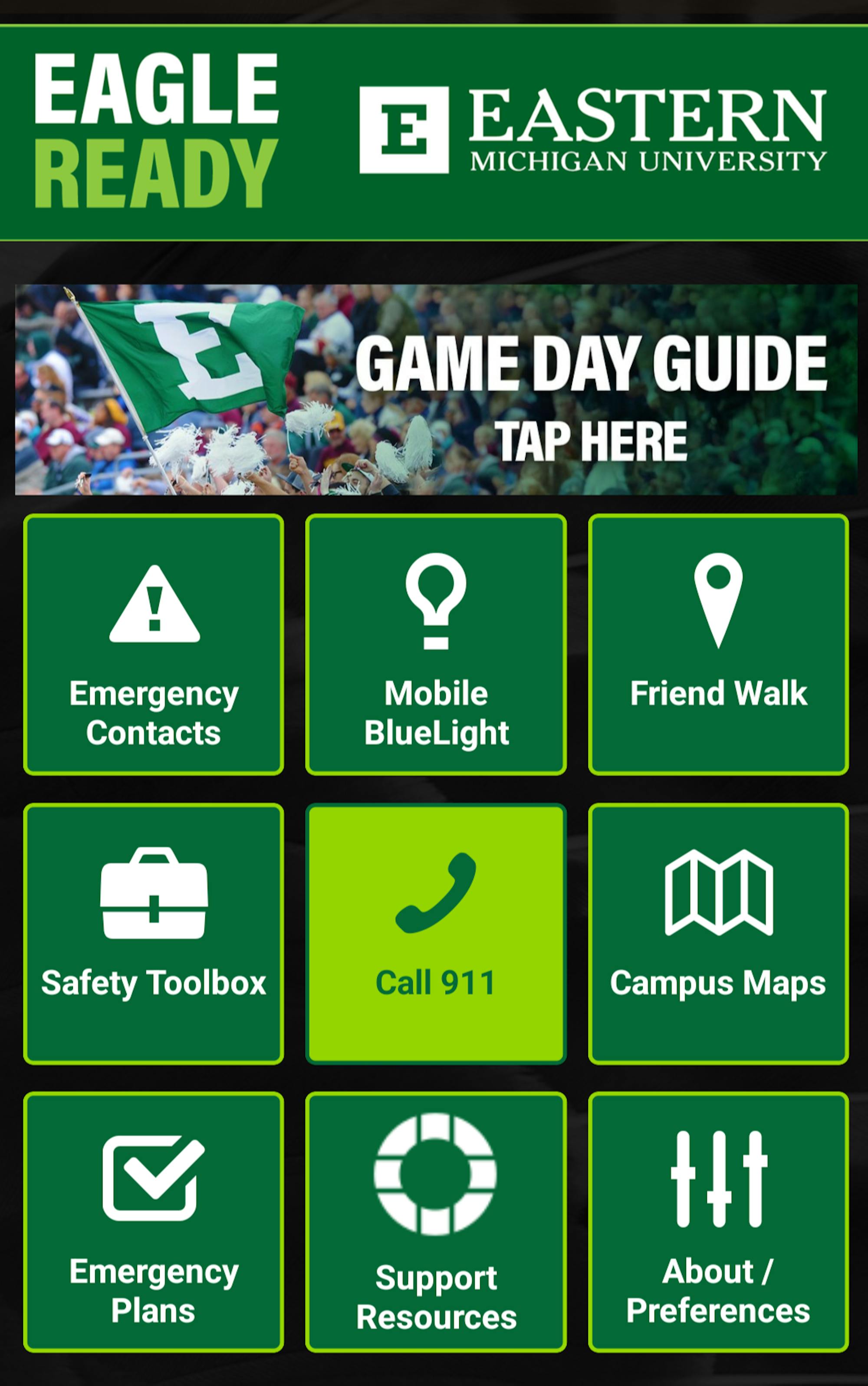
Emergency contact information
When students select “Emergency Contact Information” in the upper left square of the app, they are directed to a page listing phone numbers. There are buttons that will automatically call or text 911, which will be directed to EMU DPS. This dispatch station is monitored 24/7.
Students can also access a non-emergency line that will call DPS.
If there is an emergency off campus, students have access to Washtenaw County Dispatch.
Mobile BlueLight
BlueLight phones on campus give students access to a free, working emergency phone on kiosks along campus. This mobile option on the Eagle Ready App simultaneously sends your location to and calls DPS.
Friend Walk
Chief Lige wrote, “The Friend Walk feature is a virtual escort that is monitored via your cell phone. SEEUS is an escort provided by a member of the DPS team either on foot, in a golf cart or in the SEEUS van.” Students can use this function to call a student worker at SEEUS to have an escort walk with them on campus. There is also an emergency call option for students in a panic. This is a judgement-free, no questions asked service.
Safety Toolbox
This page of the app leads students to a number of safety resources. Accessible pages include the EMU Safety Website, the EMUPD Facebook page, the EMU Police Daily Crime and Fire Log and the Annual Safety report.
The “I’m Okay” button in the safety toolbox allows students to send a message to friends and family that they are okay if an emergency situation arises. Students can choose to either text or email loved ones this message, as well as their location. The location sent is accurate up to 15 meters.
Students can also opt-in to Eagle Alerts through Rave Mobile Safety from this page. This will send students messages to alert the campus community if an emergency occurs or is imminent. All messages sent through Eagle Alerts are credible and approved by Chief Lige. The history of these notifications can be found in the toolbox as well.
Students who have opted in to the Eagle Alert system may notice occasional tests of the system. Chief Lige wrote, “Regular testing of emergency notification systems is an important role that DPS plays with campus safety. When the system works as designed, emergency messaging is wide spread across multiple platforms. Testing also allows us to correct technical errors in system programming."
Campus maps
Students can access a digital or printable parking map of campus on this function. The digital map allows students to select what type of buildings, bathrooms, parking or bus stops they would like to locate.
There is also a link that helps students track the Westview Shuttle that travels around campus.
Emergency plans
Students can access general information on what to do in an emergency from this page. Plans for fire, active attackers, medical emergency, suspicious activity, suspicious packages, power outage, haz-mat, gas leak and severe weather are all available offline for students to access at any time.
There is also an emergency response guide available for each of these situations that goes into more detail. Lige said that these resources were a collaborative effort by DPS, Emergency Management and Environmental Health and Safety, as well as EMU stakeholders and area community first responder professionals.
Support resources
Students seeking support for various issues can access contact information for WE CARE, Counselling and Psychological Services, the Dean of Students office, the Environmental Health and Safety office, Facilities Maintenance, Housing and Residential Life, the IT Help Desk, Legal Affairs, Office of the Ombuds, Parking and Transportation, SEEUS, the Sexual Misconduct Prevention and Response office and Urgent Care at Trinity Health IHA at EMU.
Game Day Guide
Students excited to attend an EMU game can use the game day guide to find their tickets, locate parking, find a shuttle ride or review the clear bag policy.
Students interested in downloading the app can download it for free on Google Play or the App Store.
Editor's note: Eastern Echo News Reporter Laura Meriweather also contributed to this report.


